Two balances with different purposes
Rental Balance
Funded through euro top-ups and used to pay for rentals. It cannot be withdrawn to a bank account.
Earnings Balance
Your settled host earnings, reserved automatically for scheduled Stripe Connect transfers. Earnings cannot be spent as Rental Balance.
Stripe top-ups
Enter an amount and choose Top up. The bordered Top-up details area below the form explains the minimum amount, payment processing and how Rental Balance can be used.
- 01
Enter at least €10
Account → Billing shows the euro amount you will pay and receive as Rental Balance. - 02
Complete Stripe Checkout
Pay on Stripe’s hosted page. ComputeCubed never asks for card details in a node or listing form. - 03
Wait for confirmation
A successful €10 payment adds exactly €10. Pending or unsuccessful payments add no spendable credit. - 04
Check the transaction
The record shows your payment and wallet credit. Stripe references, a receipt and card brand/last four appear when supplied.
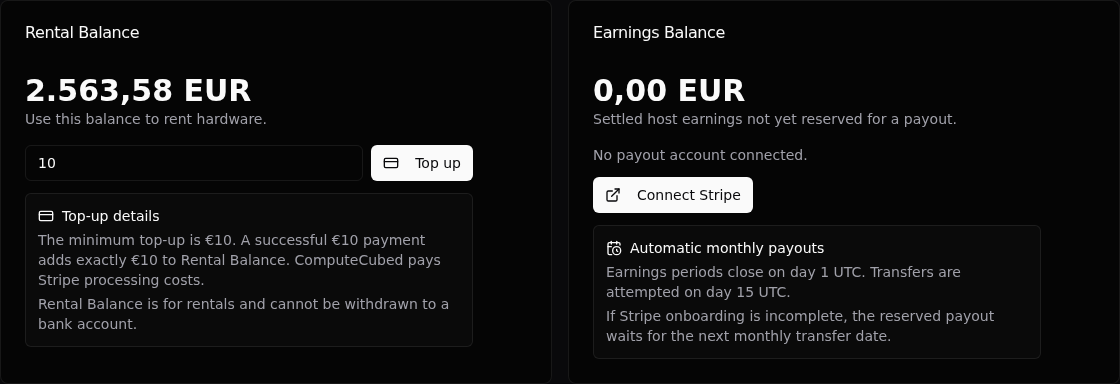
Top-ups, rental prices and balances use euros. Stripe may settle to ComputeCubed in another currency; this does not change your euro credit. ComputeCubed offers no voluntary top-up refund to a bank account or cash-out of Rental Balance. Mandatory rights remain as described in the Terms. If Stripe reverses a payment or withdraws disputed funds, the corresponding principal is removed from Rental Balance, which can become negative if already spent. If Stripe reinstates the funds, the corresponding credit is restored once.
Rental reservations, commitments, and metered charges
Hosts set the hourly earnings prices for their advertised CPU, RAM, disk and GPU resources. ComputeCubed adds a listing-specific markup. Marketplace cards and the rental review show the complete renter price, including that markup. The provider price simulator shows the host’s hourly earnings for the selected resources.
For example, a €1/hour host price with a 15% markup gives a €1.15/hour renter price. One billable hour earns the host €1 and gives ComputeCubed €0.15 of marketplace revenue before platform expenses. 15% is an illustration; the markup can differ by listing. There is no ComputeCubed host listing fee, earnings commission or withdrawal fee.
Review the selected resources, hourly price, reservation, currency, contract end date and any minimum-time terms before accepting. Quotes expire after five minutes. If prices or selections change, request and review a fresh quote; launch never silently substitutes a different price. Accepted rentals keep their host price, renter price, markup and commitment terms, including all recurring periods, even after later listing changes.
Ordinary metered rentals reserve one renter-priced hour at launch. Billing starts when capacity becomes usable. At settlement the reservation is released and the final charge is recorded. A released reservation is not a second payment to the renter and should not be added to the final charge as another cost.
Minimum-time listings instead reserve the complete displayed commitment: 1 hour, 1 day, 1 week, 2 weeks or 30 days. Uptime is measured only during that rental’s observed committed period. If it falls below the displayed threshold, the full period amount is returned to Rental Balance, with zero host earnings or marketplace revenue for that period. This is an application credit, not a bank refund. Exactly meeting the threshold passes; ending early does not prorate a passing commitment.
Recurring commitments close each period independently and reserve another at the same accepted prices. Renewal stops when balance cannot cover the next full period or it cannot fit before the contract end. A nonrecurring commitment changes to metered billing after its first period.
During a detected outage, the rental remains reserved and the Console shows Rental interrupted · Billing paused and End rental. Metered cost stops increasing until recovery is verified. Minimum-time periods use their agreed uptime rule; a paused status alone does not cancel a commitment.
Money is calculated in whole cents. Each host resource curve rounds half a cent upward, then GPU add-ons are added. Markup is applied to that combined hourly price and rounds half a cent upward. Metered host earnings and renter charges each round the total billable time upward to a cent; marketplace revenue is their exact difference. Time is not rounded separately for each polling interval or outage.
| Example with a €1 host hourly price and illustrative 15% markup | Renter charge | Host earnings | Marketplace revenue |
|---|---|---|---|
| 60 billable seconds | €0.02 | €0.02 | €0.00 |
| 1 billable hour | €1.15 | €1.00 | €0.15 |
| Passing 24-hour commitment | €27.60 | €24.00 | €3.60 |
| Commitment below its uptime threshold | €0.00 | €0.00 | €0.00 |
Automatic host payouts
- 01
Connect Stripe
Complete identity, business and bank requirements. Earnings accrue while setup is incomplete, but transfers wait for an eligible linked account. - 02
Period closes
On the 1st UTC, eligible settled earnings are reserved in a statement. Unsettled metered use waits until rental end; settled recurring periods can be paid while the rental continues. - 03
Transfer date
On the 15th UTC, ComputeCubed attempts to transfer the full statement earnings to your linked Stripe account. - 04
Review the statement
Check the earnings period, amount, included rentals, transfer status, reference and any delay reason. There is no ComputeCubed deduction from host earnings.
If the first earning occurs partway through a calendar month, that partial month joins the following full month for the first payout period. An earning exactly at the beginning of a UTC month starts a full monthly period. Later periods follow UTC calendar months.
For €80, €100 or €500 of eligible host earnings, ComputeCubed transfers €80, €100 or €500 respectively. ComputeCubed takes no earnings commission. If onboarding is incomplete, earnings remain reserved and the account is checked on the next monthly transfer date. Reversed transfers remain owed; only the outstanding amount is retried. An uncertain transfer waits for reconciliation so it cannot be paid twice.
Transferred means sent to the connected Stripe account. Stripe’s payout schedule controls later bank payments. ComputeCubed pays costs billed to the platform, including its payment-processing and Connect costs. Stripe may charge your connected account directly under your Stripe agreement. Such direct third-party costs can reduce what reaches your bank; ComputeCubed does not deduct them again or promise an exact bank receipt or arrival date. Check your Stripe account for actual bank-payout details.
Transactions, filters, and records
Rental and Earnings transaction lists are separate. Filter by time, host, listing, rental, node, entry type or direction where available. A settlement’s details show its own usage, renter charge, host earnings and included marketplace revenue, even when a rental has multiple recurring periods. The host portion and markup may appear as separate ledger entries; together they equal the renter charge.
Top-up details distinguish the full wallet credit from Stripe’s processing cost and settlement to ComputeCubed. Unknown costs remain unknown. Payout statements record eligible host earnings and transfers to Stripe. CSV exports retain separate money columns and settlement currencies. Stripe receipts document payments; payout statements document host transfers and are not proof of a bank deposit.
Use the rental ID for support. For top-ups include the payment intent or Checkout reference; for payouts include the statement and transfer reference. Never send full card numbers, private keys, WireGuard profiles or kubeconfigs.
Common payment states
| State | Meaning | Next step |
|---|---|---|
| Top-up pending | Payment has not been verified | Wait or refresh after returning from Stripe |
| Processing cost unavailable | Stripe has not supplied settlement details | Your verified full-value credit is already usable; details can arrive later |
| Insufficient Rental Balance | Balance is below the displayed reservation | Add at least €10 and enough to cover the reservation |
| Quote changed or expired | The reviewed price can no longer be accepted | Refresh and review the current quote |
| Waiting for Stripe account | Setup is missing or incomplete | Update your Stripe account; earnings stay reserved |
| Transfer scheduled | Earnings are reserved before the transfer date | No action is needed |
| Transfer retry scheduled | A transfer failed, was reversed or needs reconciliation | Check the reason and Stripe account; do not create a second payout |